

CheckAGMode
German documentation with some sample pictures: CheckAGMode
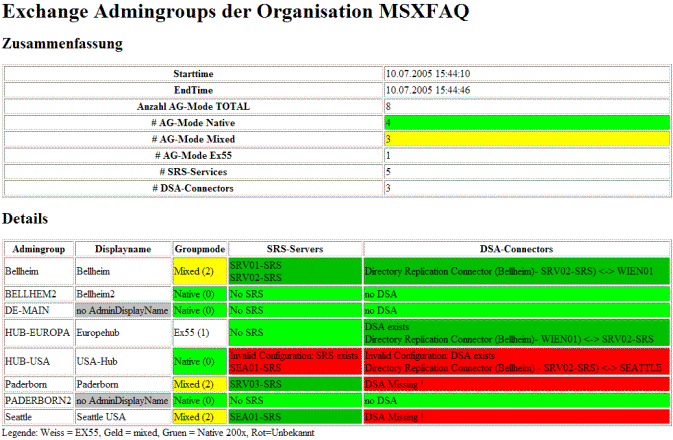
A very simple but useful tool to check the status of a migration and preparation für "native mode". This VBScript analyzes all admingroups and checks the SRS, AdminGroup Mode, ConfigCA etc. Output is generated as XML-File together with a prepared XSL-Stylesheet. Simply click the XML to see the details.
Color encoding tells your missing CA's or other problems. Please be aware, that sometimes the AD-replication has to be complete to get proper results. Here is a sample picture
CheckRUS
Do you hate the RUS ?. If the Rus is working, its great to have that thing, but its really hard to check, if its upto date with standard Microsoft tools. And it's so easy to find out, which objects are pending. Here are three scripts doing the same.
They loop through all RUS-Entries and get the HighestUSN, which was processed last. Than they query the DC like the RUS would do that to find pending objects. There are three Versions of the script
- CSCRIPT
Start it from the console and read the output on the screen. In addition the script writes a XML-File and a XSL-Stylesheet. You can use Internet Explorer to view that - MOMScript
If you run the same script with MOMHost and parameters, you can use it as a MOM-Check. PLease see MSXFAQ.DE - CheckRUS mit MOM about installing it. (It's german, but the pictures are a step by step description with an english mom) - ASP
And you can download and install it on a IIS as an ASP-Application. Make sure, that you have to authenticate für that script, so the script inherits your permissions to read the AD-attributes.
checkrusmom.v.1.3.vbs
Console-Version and MOM Script in one file
checkrusv1.0.asp
ASP Version
Here is a output sample

German Documentation with some sample pictures: CheckRUS and CheckRUS mit MOM
QuerybasedSG
We all know, that query based distribution groups are nice für building dynamic teams. but unfortunaly they only work with Exchange 2003 native mode. And you grant permissions on public folders. So i wrote a script to maintain the members of security groups. Here we have your query based security groups. But you have to start that script regulary.
Please specify the DN of the grop as first parameter. für setting the filter you can use two modes.
- Mode1: use the content of exactly one field. Here "Department contains "Sales"
cscript querybasedsg.2.0.vbs cn=SGG-Sales,ou=Account,dc=msxfaq,dc=local Department sales
- Mode2: If you want do some more sophisticated LDAP-Querys simply use
cscript querybasedsg.2.0.vbs cn=SGG-Sales-USA,ou=Account,dc=msxfaq,dc=local "&(department=Vertrieb)(country=US)
German documentation with some sample pictures: Querybased Groups
RGADMap
Tries to map Exchange servers with their routing group and the corresponding AD-Site. Please remember, that Exchange 2007 will use AD-Sites to find the best way. It's a good idea to have all Exchange 200x Servers in one routing group in one AD-Site. This Script dumps these details für further investigation.
Output is a XML-File with corresponding stylesheet and can be displayed with Internet Explorer.
Currently i have no time to develop that script to compare "RG-Connectors" with "AD-Sitelinks and to compare them again Source, Target and Costs. Duping the connectors with their Targets is already public at DumpConnector
MailboxReport
This tool uses LDAP to find all Users and then MAPI to connect to every mailbox. It runs recursively through all folders and collects various information about the foldersize, number of items and may more. Output is a XML-File again. You can use Excel an pivot tables to do some analysis about the usage of the mailboxes.
mvpsonly/mailboxreport.2.6.vbs.zip
Geman documentation at MBReport
EASLog
This script parses the IISLogs, collects all "/Microsoft-Server-ActiveSync"-request, counts the number, the distance of that request (Nice to find out AUTD timeouts etc.) and lists Users, their deviceID, last contact, amount of traffic etc.
Please check out EASLog für some more pictures and details. You can also use the generated output für more reports with Excel etc. The script reads ONE given IISLog or you can pipe multiple files with "type"to stdin.

















